Top AI Release Notes Templates: 7 SaaS Examples You Can Copy (2025)
Copy proven AI release notes templates from Anthropic, Raycast, Cron, and other top SaaS companies. Includes AI-powered automation tips and real examples from 2025.

Top AI Release Notes Templates: 7 SaaS Examples You Can Copy (2025)
The best release notes follow repeatable patterns. We analyzed 50+ SaaS companies shipping in 2025 to extract the exact templates they use—so you can copy what works without starting from scratch. Plus, learn how AI-powered release notes tools can automate this entire process.
Why Templates Matter More Than Ever
In 2025, users expect polished communication. According to ProductLed Institute's 2024 report, 73% of users say release notes quality directly impacts their trust in a product.
But here's the problem: most teams don't have a dedicated technical writer. Product managers are writing release notes at 6pm on Friday, trying to remember what shipped that week.
The solution? A proven template you can fill in consistently, every time.
What Makes a Template Worth Copying?
Before we dive into examples, every template here meets these criteria:
- Fills in under 10 minutes - No bloated structure requiring deep thought
- Works for technical and non-technical audiences - Adaptable tone
- Scales from small fixes to major launches - Flexible format
- Looks professional with zero design work - Clean by default
- Maintains consistency across releases - Recognizable pattern
Now let's see the templates.
Template 1: The Anthropic Pattern (AI-First Clarity)
Best for: Technical products with both developer and business users
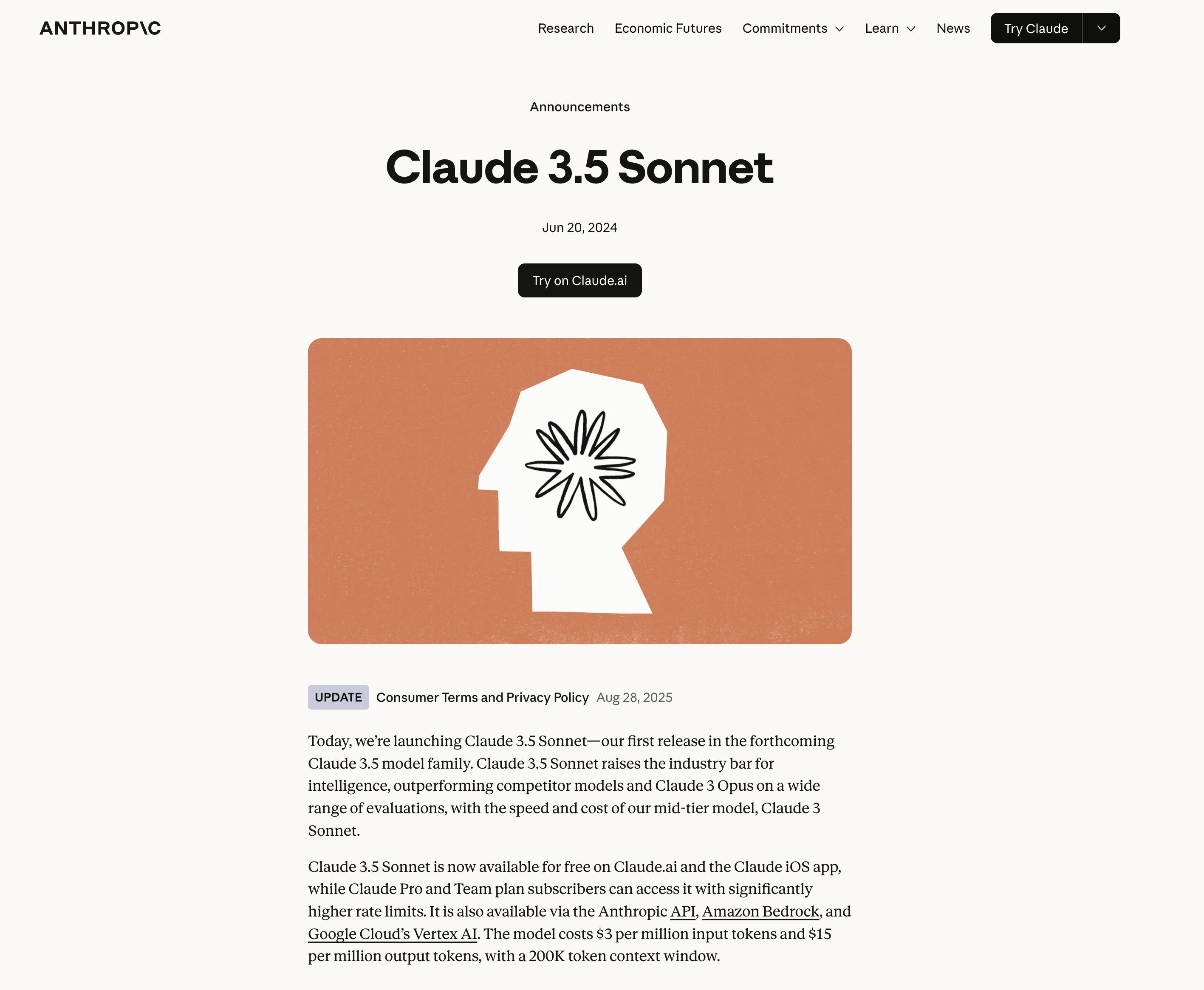 Example: Anthropic's Claude release notes demonstrate clear capability descriptions and quantified improvements
The Template:
## [Model/Feature Name] — [Date]

### What's New
[One sentence describing the core improvement]

### Key Capabilities
- [Capability 1 with specific metric]
- [Capability 2 with use case]
- [Capability 3 with comparison]

### Who Should Use This
[Specific audience and when they should upgrade]

### Technical Details
[Model name, API version, pricing if changed]

[Link to documentation]
Real Example:
## Claude 3.5 Sonnet — December 2024

### What's New
Significant improvements in coding, visual reasoning, and instruction following.

### Key Capabilities
- Coding accuracy increased 20% on SWE-bench verified
- Stronger visual understanding for charts and diagrams
- Better instruction following in complex, multi-step tasks

### Who Should Use This
Recommended for all users. Especially valuable for software development,
data analysis, and workflows requiring precise multi-turn conversations.

### Technical Details
Model: claude-3-5-sonnet-20241022
Same pricing as previous version
[API migration guide →]
Why This Works:
- Separates "what" from "who should care"
- Quantified improvements (20% increase)
- Clear migration path
- No marketing fluff, just facts
Copy this when: You're shipping technical improvements to a mixed audience
Template 2: The Raycast Pattern (Power User Focus)
Best for: Productivity tools, developer tools, apps with keyboard shortcuts
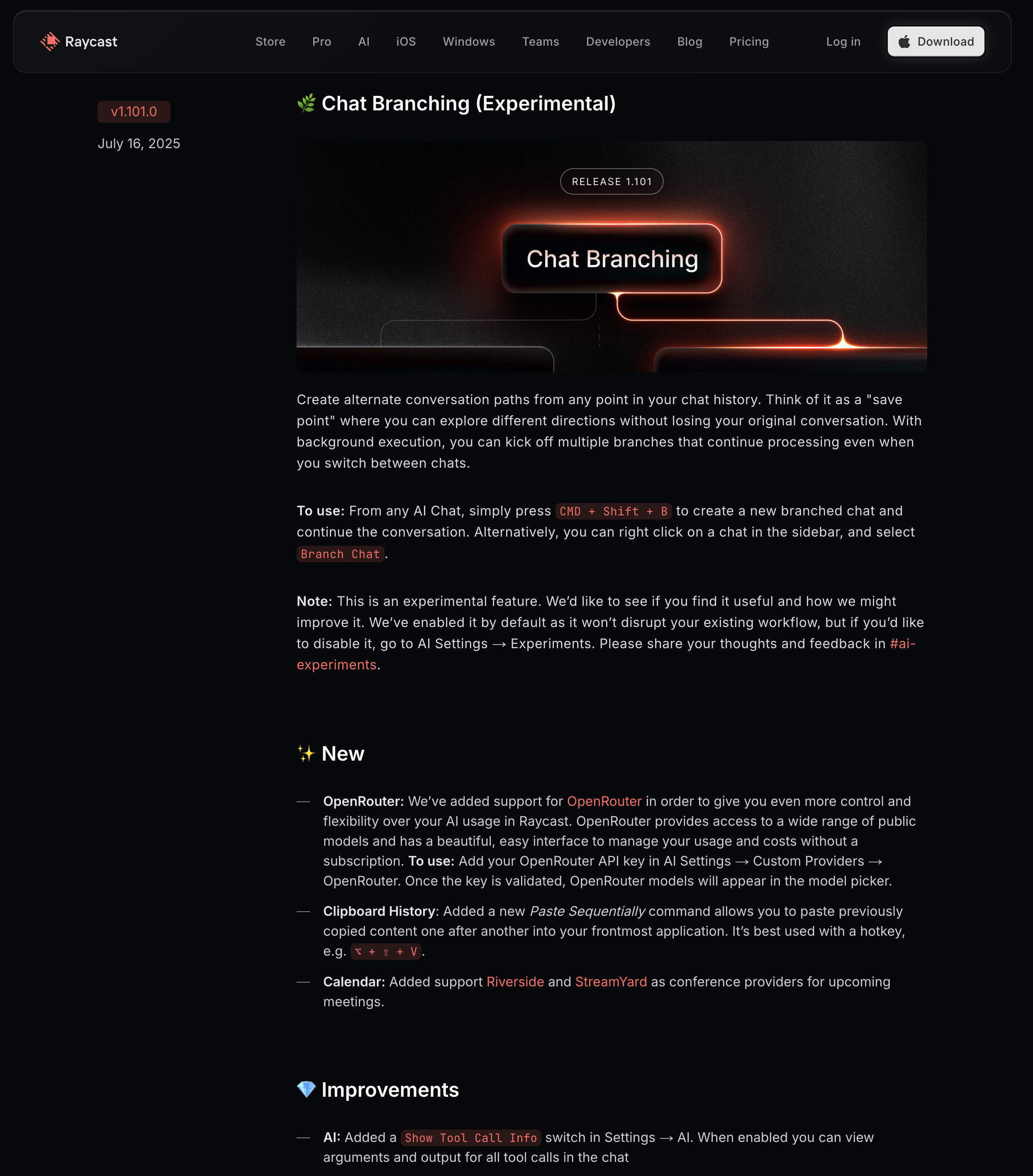 Raycast's changelog demonstrates power-user focus with prominent keyboard shortcuts and emoji categorization
The Template:
⚡ [Feature Name]

[One sentence benefit statement]

**How to use:** [Keyboard shortcut or command]

**Perfect for:**
- [Use case 1]
- [Use case 2]

[30-second GIF showing it in action]

---

🐛 **Fixes**
- [Bug description] → Now [fixed behavior]
- [Performance improvement with metric]

---

🔜 **Coming Soon**
[One upcoming feature to build anticipation]
Real Example:
⚡ AI Chat with Window Context

Ask AI about any window on your screen without taking screenshots.

**How to use:** ⌘ + Shift + Space while focused on any app

**Perfect for:**
- Getting summaries of long documents
- Asking questions about code without context switching
- Translating content from any application

[GIF showing chat overlay on VS Code]

---

🐛 **Fixes**
- Search results now load 3x faster for large datasets
- Fixed clipboard history not syncing across devices

---

🔜 **Coming Soon**
Custom AI models support (bring your own API key)
Why This Works:
- Emoji categorization enables instant scanning
- Keyboard shortcuts front and center (users came for productivity)
- GIFs show interaction patterns text can't describe
- "Coming Soon" teaser keeps users engaged
Copy this when: Your users care about speed and efficiency
Template 3: The Cron Pattern (Minimal but Mighty)
Best for: Calendar apps, scheduling tools, time-sensitive products
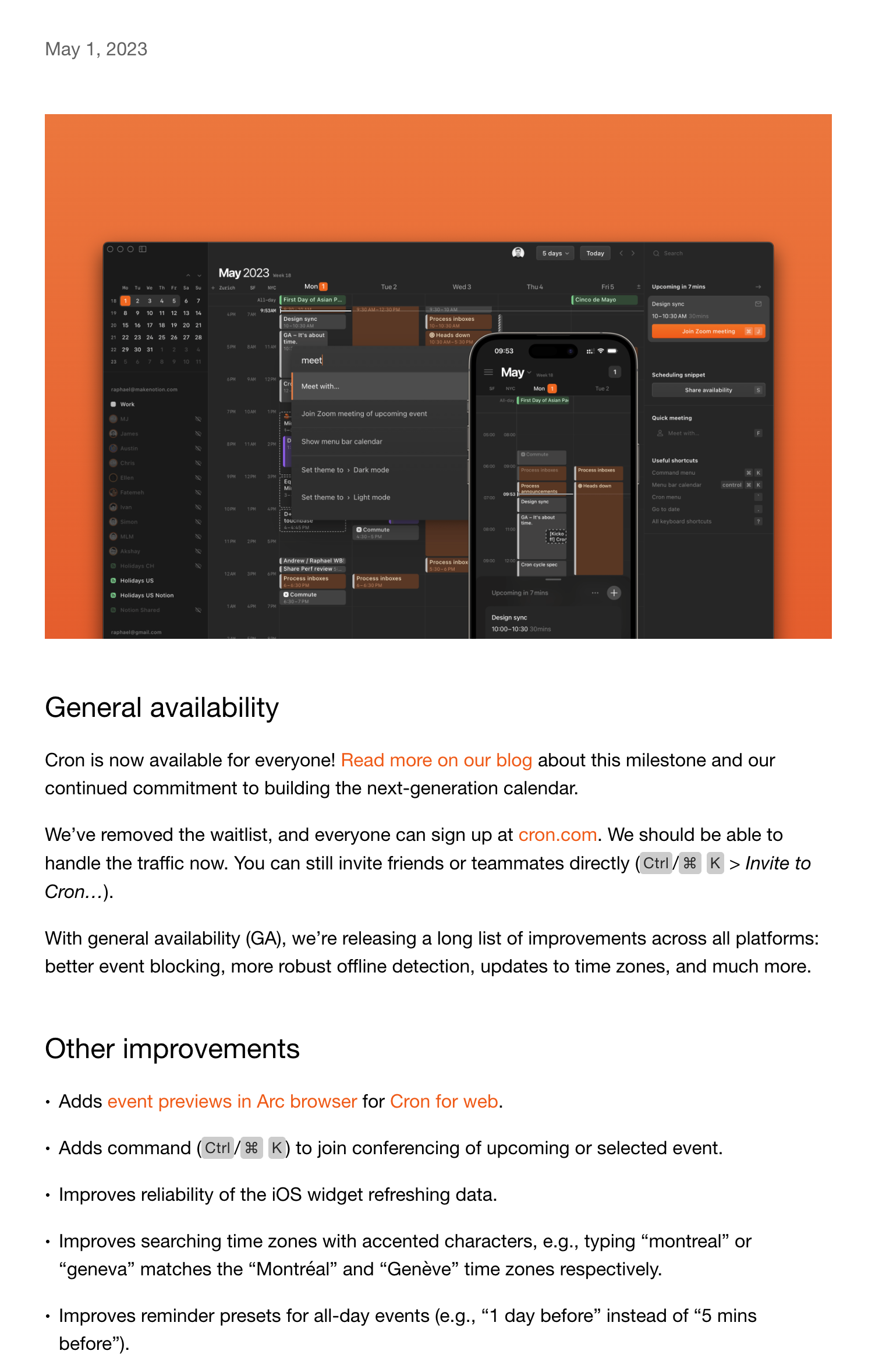 Cron's ultra-minimal approach with single-sentence updates and clean typography
The Template:
### [Month Year]

**[Feature]**
[Single sentence. Period.]

**[Improvement]**
[Single sentence. Period.]

**[Fix]**
[Single sentence. Period.]

---

**[Next Month Preview]**
[One-line teaser]
Real Example:
### December 2024

**Time zone intelligence**
Cron now auto-detects participant time zones and suggests optimal meeting times.

**Faster search**
Calendar search now returns results as you type, no Enter key needed.

**Fixed recurring events**
Editing one instance of a recurring event no longer affects unrelated events.

---

**January Preview**
Team scheduling templates.
Why This Works:
- Respects user time (scannable in 30 seconds)
- No category bloat (New/Improved/Fixed is enough)
- Clean typography does the heavy lifting
- Preview creates anticipation without overwhelming
Copy this when: Your product philosophy values simplicity and calm
Template 4: The Retool Pattern (Enterprise-Ready)
Best for: Internal tools, B2B SaaS, products used by multiple roles
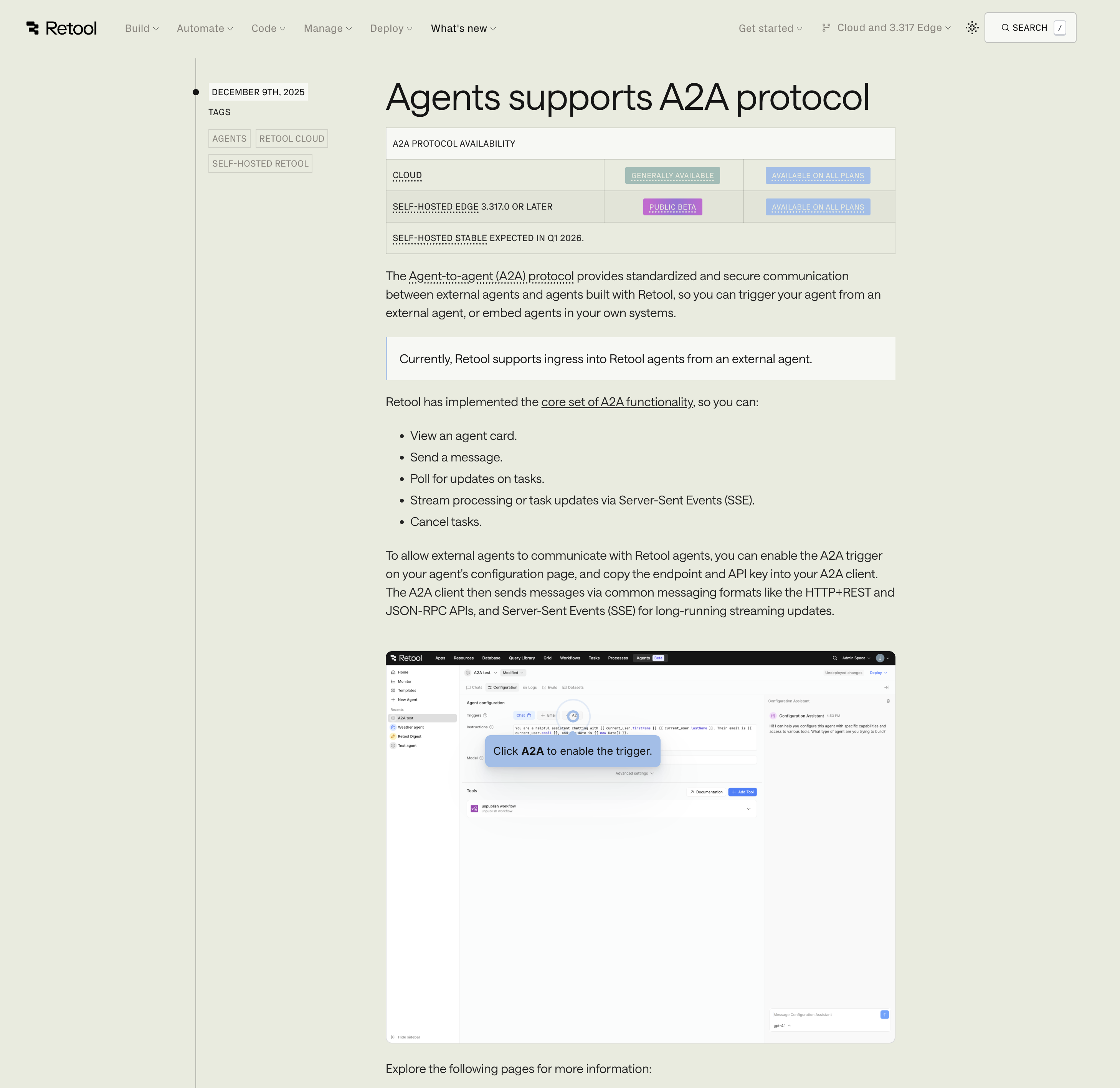 Retool's changelog shows separate sections for builders and admins with security focus
The Template:
# [Release Version] — [Date]

## 🎯 For Builders
### New Components
- **[Component Name]**: [Description] ([Beta/GA])
- **[Component Name]**: [Description] ([Beta/GA])

### Improvements
- [Specific improvement with metric]

## 🔐 For Admins
### Security & Compliance
- [Security feature or compliance certification]

### Performance
- [Infrastructure improvement]

## 📅 Rollout Schedule
- **Cloud customers**: [Date]
- **Self-hosted**: [Version and date]

## 📖 [Documentation] | [Migration Guide] | [Video Tutorial]
Real Example:
# Version 3.42 — December 12, 2024

## 🎯 For Builders
### New Components
- **AI Query Builder**: Generate SQL from natural language (Public Beta)
- **Floating Action Button**: Persistent CTAs that stay visible on scroll (GA)

### Improvements
- Table component now supports virtual scrolling (10x faster for 100k+ rows)
- Workflow debugger shows detailed execution logs

## 🔐 For Admins
### Security & Compliance
- SOC 2 Type II certification completed
- Granular permission controls for workflow triggers

### Performance
- 40% reduction in initial app load time
- Database query caching now enabled by default

## 📅 Rollout Schedule
- **Cloud customers**: Live now
- **Self-hosted**: v3.42 available Dec 15

## 📖 [Full Changelog] | [SQL Builder Guide] | [3-min Video Tour]
Why This Works:
- Separate sections for different job functions
- Beta/GA labels manage expectations
- Security gets top-level attention (critical for enterprise)
- Rollout schedule prevents "why don't I see this?" support tickets
- Multiple doc formats (read/watch preference)
Copy this when: You serve multiple roles within customer organizations
Template 5: The Railway Pattern (Developer-First Technical)
Best for: DevOps tools, infrastructure platforms, APIs
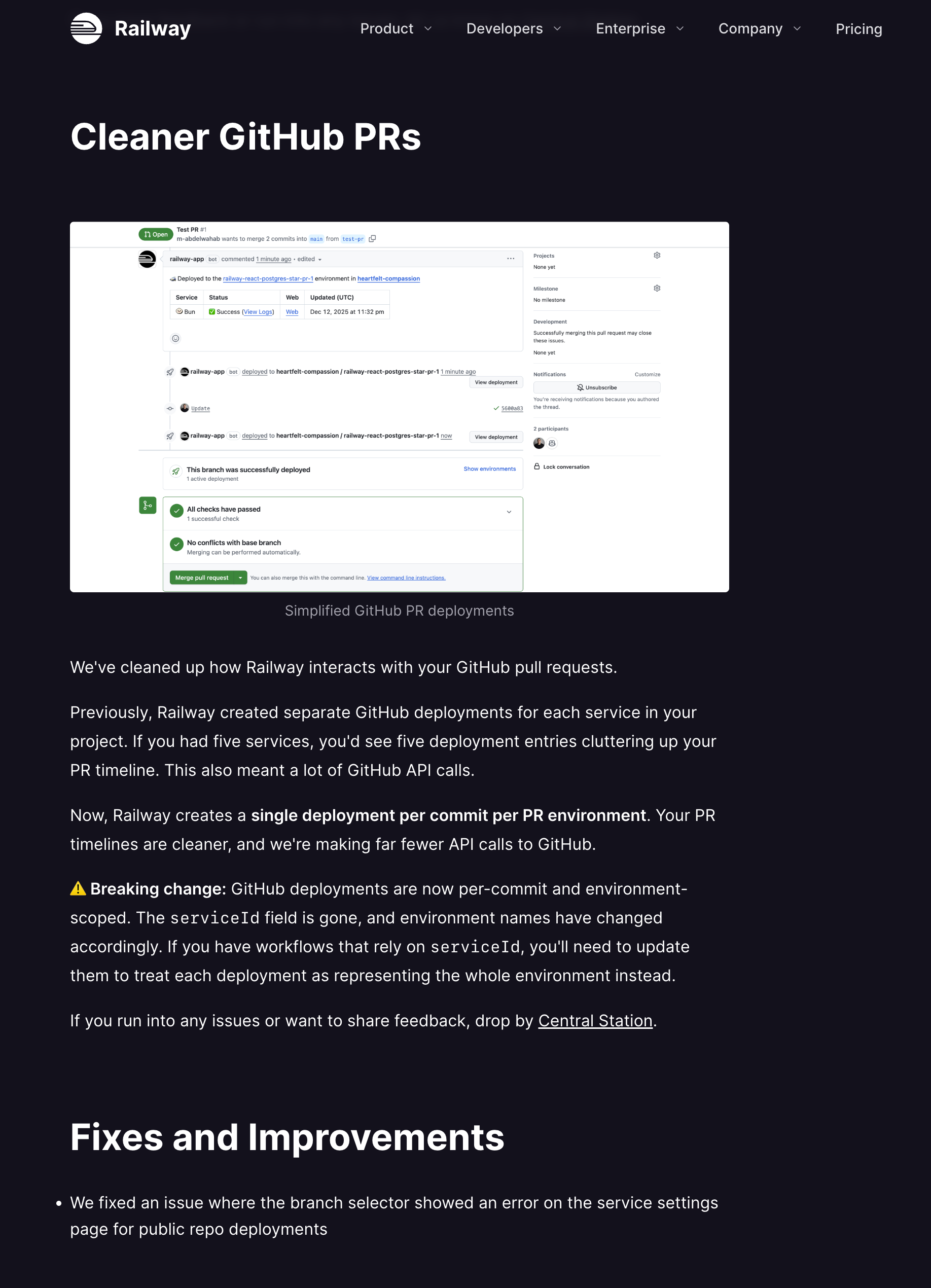 Railway's developer-focused changelog features code diffs, migration guides, and technical specifications
The Template:
## [Feature Name]

**TL;DR:** [One technical sentence]

### What Changed
```diff
- Old behavior or API endpoint
+ New behavior or API endpoint
Migration Required?
[Yes/No] - [If yes, deadline and automatic migration details]
Example Usage
[Code snippet showing the feature]
Technical Details
- [Specific implementation note]
- [Performance characteristic]
- [Compatibility info]
Monitoring
[How to check if it's working, metrics endpoint, logs to watch]
Questions? [Join Discord] | [Read docs] | [See GitHub discussion]
**Real Example:**
```markdown
## Zero-Downtime Deployments (All Plans)

**TL;DR:** Rolling deployments now available on all plans, not just Pro.

### What Changed
```diff
- Deployments caused 2-5 second downtime during container swap
+ New deployments route traffic only after health check passes
Migration Required?
No - Automatically enabled for all new deployments starting Dec 1.
Example Usage
# railway.toml
[deploy]
  healthcheckPath = "/health"
  healthcheckTimeout = 30
Technical Details
- Health check must respond within 30s or deployment rolls back
- Old container stays alive until new one passes health check
- Works with HTTP and TCP health checks
- Zero config needed if you have a /health endpoint
Monitoring
Watch railway logs during deployment for health check status.
New metric: deployment.healthcheck.duration in your dashboard.
Questions? [Join Discord] | [Health Check Docs] | [GitHub Discussion #892]
**Why This Works:**
- Code diffs are instantly clear to developers
- Migration section prevents surprise breaking changes
- Code example enables immediate testing
- Monitoring guidance prevents "is this working?" questions
- Multiple support channels for different preferences
**Copy this when:** Your users are comfortable with code and care about implementation
---
## Template 6: The PostHog Pattern (Data-Driven Product)
**Best for:** Analytics tools, data products, metrics-heavy features
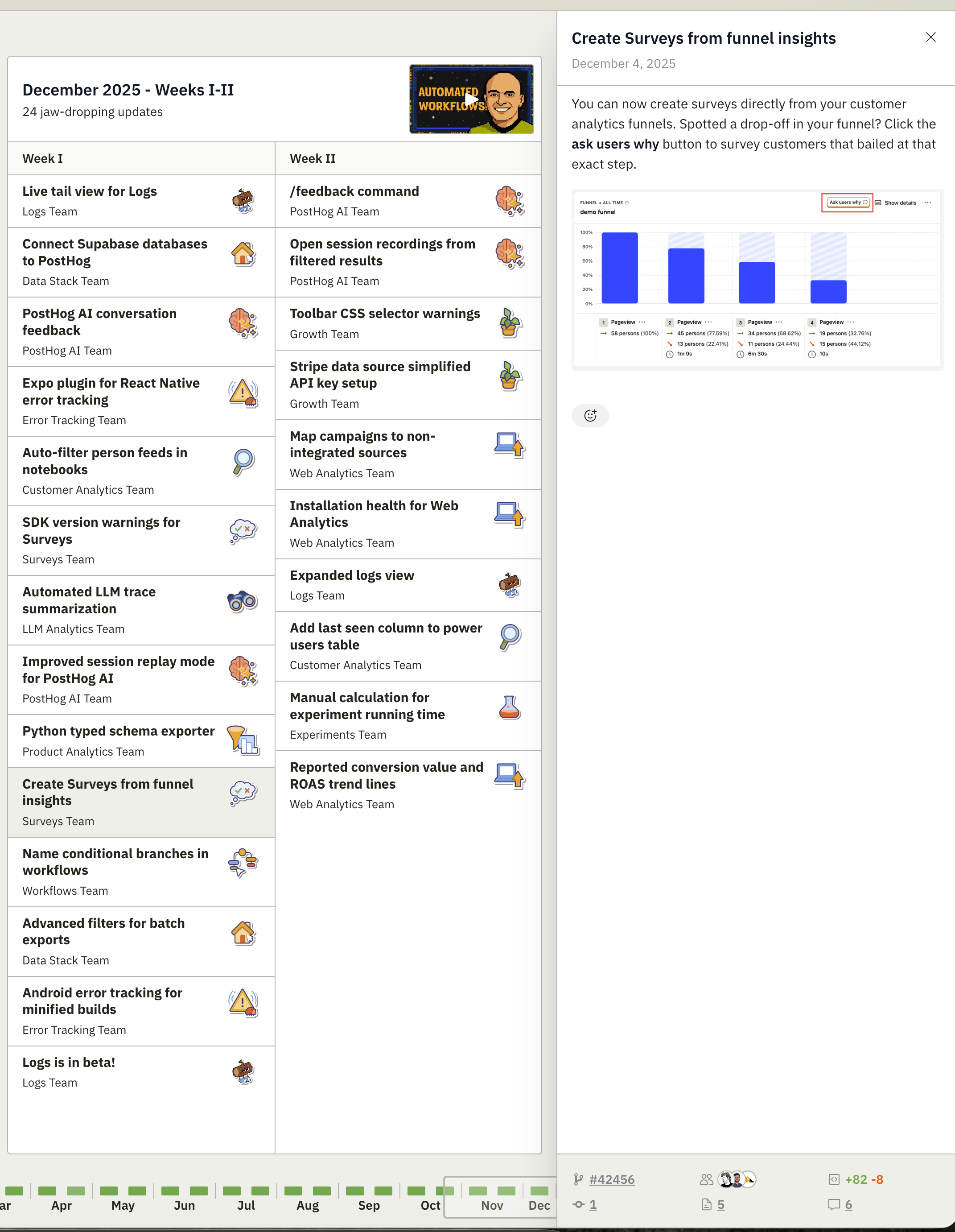
*PostHog's changelog emphasizes metrics, before/after comparisons, and quantified user impact*
**The Template:**
```markdown
## [Feature Name]
### The Numbers
- **[Metric]**: [Before] → [After] ([% change])
- **[Metric]**: [Before] → [After] ([% change])
- **User impact**: [How many users or actions affected]
### What This Means For You
[Plain-English explanation of impact]
**For [User Type 1]:**
[Specific benefit with example]
**For [User Type 2]:**
[Specific benefit with example]
### How We Did It
[1-2 sentences on technical approach, for curious folks]
### Before/After
[Side-by-side screenshots or charts showing improvement]
[Link to methodology or deeper technical post]
Real Example:
## Session Replay Performance Improvements

### The Numbers
- **Load time**: 3,200ms → 450ms (7x faster)
- **Memory usage**: Reduced by 60%
- **User impact**: 50,000+ daily session replays now load instantly

### What This Means For You
No more waiting for session replays to buffer or choppy playback.

**For product teams:**
Debug user issues in real-time without lag interrupting your workflow.

**For customer success:**
Review session replays during support calls without making customers wait.

### How We Did It
Implemented lazy loading for replay segments and optimized our compression
algorithm to reduce payload size by 65%.

### Before/After
[Side-by-side comparison: old replay taking 3.2s to load, new replay <500ms]
[Chart showing load time improvements across different session lengths]

[Read: The technical deep-dive on replay optimization →]
Why This Works:
- Numbers earn trust (not just "faster"—7x faster)
- Segmented benefits (different roles care about different things)
- Before/after visual proof eliminates skepticism
- Technical depth available for those who want it
Copy this when: You can quantify improvements and serve multiple user types
Template 7: The Linear Pattern (Minimal Elegance)
Best for: Products that value design, tools for makers, apps emphasizing craft
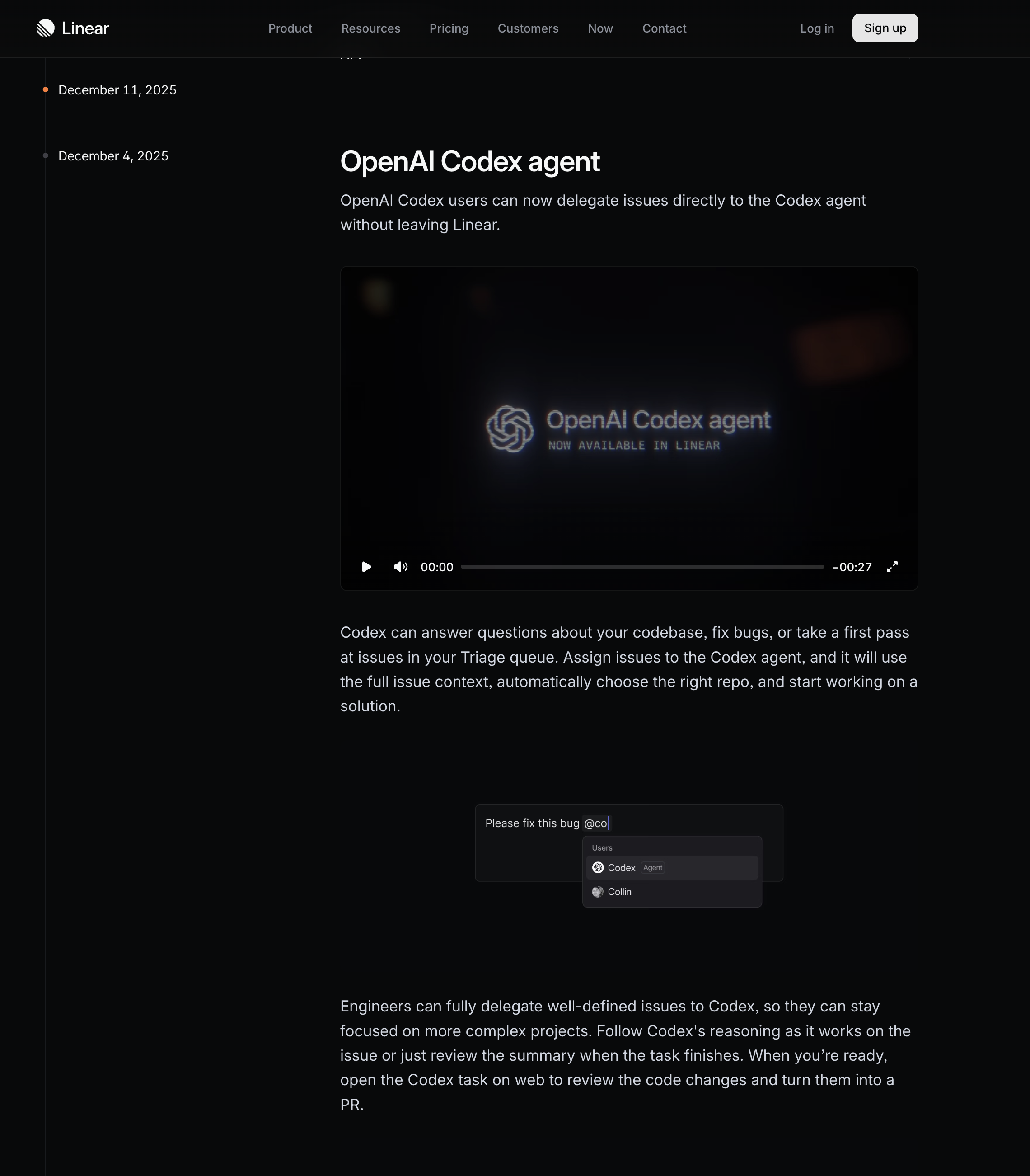 Linear's release notes exemplify minimal elegance with beautiful design and concise communication
The Template:
[Beautiful branded header image]

# [Feature Name]

[Single perfect sentence describing what it does]

[One pristine screenshot showing the feature in ideal conditions]

[2-3 sentences maximum providing just enough detail]

[Single CTA button: Try it now / Read docs / Watch demo]

---

[Footer: Previous updates | Subscribe | Follow progress]
Real Example:
[Gradient purple/blue header]

# Focus Mode

A distraction-free environment for deep work on a single task.

[Full-width screenshot: Clean interface showing single task, muted sidebar, centered content]

Press ⌘ + Shift + F to enter Focus Mode. Everything except your current task
fades away. Exit anytime or wait for your Focus session to end. Now you can
think without context-switching.

[Button: Try Focus Mode →]

---

Previous updates | Subscribe to changelog | Follow our progress
Why This Works:
- Design quality signals product quality
- Extreme brevity respects user attention
- Single screenshot does most of the communication
- CTA gets users to experience it, not just read about it
- Minimal footer maintains the calm aesthetic
Copy this when: Your brand values craft and your users appreciate beautiful details
Universal Template Structure (Works For Anyone)
Can't decide? Use this adaptable structure that combines best practices from all seven:
## [Emoji] [Feature Name]

[One sentence describing the benefit, not the feature]

### What's New
- [Change 1 with metric or context]
- [Change 2 with metric or context]
- [Change 3 with metric or context]

### Why It Matters
[2-3 sentences explaining impact on user workflow]

### How to Use It
[Simple instruction or link to guide]

[Screenshot or GIF if visual change]

---

**Also in this release:**
- [Minor improvement]
- [Bug fix]

**Coming next:** [One-line preview]

[Footer: Docs | Support | Roadmap]
Customize it:
- More technical audience? Add "Technical Details" section
- Community-driven? Add "Requested by" attribution
- Enterprise? Add "Security" and "Rollout Schedule" sections
- Developer tool? Add code examples and migration notes
Downloadable Template Pack
We've packaged all 7 templates as copyable markdown files:
Download includes:
- ✅ 7 markdown templates (Anthropic, Raycast, Cron, Retool, Railway, PostHog, Linear)
- ✅ Fill-in-the-blank examples
- ✅ Image dimension recommendations
- ✅ Tone and voice guidelines for each style
- ✅ Decision tree: Which template to use when
Download the Complete Template Pack →
Making Templates Sustainable with AI Release Notes
The template is only half the battle. The real challenge is filling it consistently every week.
Most product teams struggle because:
- Updates are scattered across Slack, Jira, Linear, GitHub
- Gathering everything takes 2+ hours
- By Friday, you forgot what shipped Monday
- Formatting is manual and tedious
This is where AI release notes tools change everything.
AI-powered release notes generators like ReleaseNotes.pm automate the entire workflow:
- Collects updates from Slack automatically using AI
- AI organizes fragments by category (Features, Bug Fixes, Improvements)
- AI suggests polished, template-ready descriptions
- Maintains your chosen template structure automatically
- Publishes directly to your changelog
The result? Your Friday release notes take 10 minutes, not 2 hours—and the AI handles all the heavy lifting.
How AI Release Notes Work
Modern AI release notes tools use natural language processing to:
- Extract key information from scattered messages and updates
- Categorize changes automatically (new features vs bug fixes)
- Rewrite messy notes into professional, customer-facing language
- Match your brand voice after learning from past release notes
- Format consistently using your preferred template
Instead of manually copying from Slack, rewriting technical jargon, and formatting markdown, AI release notes tools do this in seconds.
Join the waitlist for AI-powered release notes
Template Selection Guide
Still not sure which template to use? Here's the decision tree:
Choose Template 1 (Anthropic) if:
- You ship AI/ML models or technical infrastructure
- Audience spans developers to executives
- Benchmarks and metrics are core to your value
Choose Template 2 (Raycast) if:
- Speed and productivity are your core promise
- Keyboard shortcuts are a primary interface
- Users want to skim in under 60 seconds
Choose Template 3 (Cron) if:
- Your brand emphasizes calm and simplicity
- Users resist complexity and noise
- Visual design carries more weight than words
Choose Template 4 (Retool) if:
- You sell to enterprises with multiple stakeholders
- Security and compliance are frequently discussed
- Different roles use your product differently
Choose Template 5 (Railway) if:
- Your users are primarily developers
- API changes and technical accuracy are critical
- Migration guides and code examples are expected
Choose Template 6 (PostHog) if:
- You can quantify improvements with data
- Multiple user roles consume your updates
- Transparency and metrics build trust with your audience
Choose Template 7 (Linear) if:
- Visual design is central to your brand
- You prefer "show don't tell"
- Users appreciate craft and attention to detail
Choose the Universal Template if:
- You're just starting out
- You need flexibility across release types
- You want to adapt over time
Common Template Mistakes to Avoid
Even with a template, teams make these errors:
1. Template Theatre
❌ Bad: Rigidly following structure even when it doesn't serve users
## New Feature: Dark Mode

### What's New
- Dark mode

### Why It Matters
Users wanted dark mode

### How to Use It
Click the dark mode button
✅ Good: Adapt the template to match the feature significance
⚡ Dark Mode

Your eyes will thank you. Enable it in Settings → Appearance.

Perfect for late-night work sessions.
Lesson: Templates guide, they don't dictate. Use judgment.
2. Category Bloat
❌ Bad: Creating 12 categories for 3 updates
🎨 Design Improvements
- None this week

⚡ Performance Enhancements
- None this week

🐛 Bug Fixes
- Fixed login button

🔐 Security Updates
- None this week

📚 Documentation
- None this week
✅ Good: Only show categories with updates
🐛 Fixed: Login button now responds immediately (was delayed ~500ms)
Lesson: Empty categories are noise. Only display what's relevant.
3. Template Inconsistency
❌ Bad: Different format every week
- Week 1: Bullet points
- Week 2: Paragraphs
- Week 3: Tables
- Week 4: Bullet points but different order
✅ Good: Same structure, different content Every week: Emoji → Title → Benefit → How to use → Screenshot
Lesson: Consistency builds trust. Users know where to look.
4. Template Over-Engineering
❌ Bad: 47-field template requiring 3 hours to fill
[Primary Category (required)]
[Secondary Category (optional)]
[Tertiary Category (optional)]
[Feature name (50 char max)]
[Feature name alternate (50 char max)]
[Feature summary (required)]
[Feature summary alternate (optional)]
[User persona affected (dropdown)]
[Technical specifications (if applicable)]
...
✅ Good: 5 fields, fillable in 10 minutes
[Category emoji]
[Title]
[One-sentence benefit]
[2-3 bullet points]
[Link or screenshot]
Lesson: The best template is one you'll actually use.
Templates in Action: Before and After
Here's how teams improved their release notes with structured templates:
Before (No Template)
Updates:
- Made some performance improvements
- Fixed bugs
- Added new feature to dashboard

Let us know if you have questions!
Problems:
- Vague ("some improvements" means nothing)
- No categorization (scanning is hard)
- No user benefit (why should they care?)
After (Template Applied)
⚡ Performance: Dashboard loads 3x faster
Large datasets (10k+ rows) now load in under 2 seconds.
Most impactful for customer success teams managing enterprise accounts.

🎨 New: Bulk export to CSV
Select multiple reports and export them in one click.
Save hours on monthly executive reporting.

🐛 Fixed: Chart rendering on mobile
Pie charts now display correctly on iOS devices.

[Link to docs] | [Watch 2-min demo]
Improvements:
- Specific metrics (3x, 10k rows, 2 seconds)
- Clear categories with emoji
- User benefits stated explicitly
- Helpful resources linked
Result: Support tickets decreased 40% the following week.
Scaling Your Template System
As your product matures, you might need multiple templates:
Template Hierarchy Example:
Major Release Template (quarterly)
- Full landing page design
- Video walkthrough
- Multiple screenshots
- Customer testimonials
- Pricing implications
Minor Release Template (weekly)
- Changelog entry format
- 1-2 screenshots
- Link to docs
- Brief description
Hotfix Template (as needed)
- Issue description
- Resolution
- Who was affected
- Preventative measures
Deprecation Template (3-6 months notice)
- What's being deprecated
- Why
- Migration path
- Support timeline
This hierarchy prevents both under-communicating major launches and over-communicating small fixes.
Template Maintenance Checklist
Templates need occasional updates. Review quarterly:
- Are all template sections still relevant?
- Has our audience changed? (More technical? Less?)
- Are we consistently skipping certain template fields? (Remove them)
- Do users understand our categorization? (Survey or ask support)
- Have competitors improved their release notes? (Steal good ideas)
- Does the template reflect our current brand voice?
- Can new team members fill it out without help?
- Is there a template field that always causes confusion? (Clarify or remove)
Advanced Template Techniques
1. Progressive Disclosure
Layer information so users choose their depth:
## Faster API responses

[Headline: 10x faster]

> Expand for technical details ▼

Our new caching layer reduces median response time from
250ms to 25ms by...
[Technical explanation]
2. Personalized Templates
Different segments see different notes:
- Free users: Feature highlights + upgrade CTA
- Pro users: All updates including advanced features
- Enterprise: Security, compliance, and admin features
3. Interactive Templates
Embed functionality in release notes:
## New: Keyboard shortcuts

Try it right now: Press `?` to see all shortcuts
[Live demo embedded in release note]
4. Template Versioning
Track template changes over time:
- Version 1.0: Initial structure
- Version 1.1: Added metrics requirement
- Version 2.0: Split into technical/non-technical versions
Helps new team members understand "why is it structured this way?"
Conclusion: Your Template Strategy
The companies shipping the best release notes in 2025 share one trait: they decided on a template and stuck with it.
Your action plan:
- Choose one template from this list (or adapt the Universal Template)
- Use it for 4 consecutive releases without changing structure
- Measure engagement (clicks, time on page, feedback received)
- Iterate based on data, not hunches
- Document your template so anyone can fill it out
The template isn't about limiting creativity—it's about channeling your effort into content, not structure.
Stop starting from scratch every week.
ReleaseNotes.pm is an AI release notes generator that maintains your template automatically, organizes scattered updates, and helps you ship consistent release notes in minutes instead of hours. Let AI handle the tedious work while you focus on shipping.
Join the waitlist for AI-powered release notes
Questions about which template fits your product? We'd love to help you choose. Share your product type and audience, and we'll recommend the best starting template.
Ready to simplify your release notes?
Turn your Slack updates into polished release notes automatically.
Join the waitlist→